Every day, critical delivery knowledge is created across your team's collaboration and chat tools — and quietly lost. This is how a source-backed AI assistant turns those everyday conversations into living documentation: answers in seconds, decisions preserved, and knowledge that never goes stale.

The problem: Undocumented knowledge costs organizations an estimated $9 trillion a year, drains up to 25% of revenue, and has teams spending one day out of every five just searching for answers that already exist. (Deloitte 2026, Bloomfire 2025, Atlassian 2025)
The move: Not another chatbot, but a source-backed AI assistant that lives inside Microsoft Teams —answering in seconds, escalating to a human when evidence is thin, and re-indexing every answer so knowledge compounds instead of disappearing. This is AI that really works in daily operations. Here's how.
The real productivity breakthrough from AI does not come from adding another assistant to the enterprise stack. It comes from helping teams preserve the knowledge they already create every day but rarely have time to document properly: architecture decisions, troubleshooting paths, design trade-offs, operational agreements, and implementation context shared across conversations.
This is the story of a Microsoft Teams integration designed around that problem: turning daily project conversations into a source-backed, reusable knowledge base. The goal was not to ask teams to stop delivery work and write perfect documentation. It was to make the knowledge produced during delivery easier to capture, retrieve, validate, and reuse.
When AI captures knowledge as fast as teams create it, documentation stops being a task, and starts being a by-product of getting work done.
Before we move on, I’d like to thank the team behind this live AI integration —Facundo Báez, Jerónimo Colombo, Matías Lera, and Javier Macchiavello— for their contribution across the architecture implementation, cross-team integration, and operational hand-off activities that helped turn the scenario into a practical capability for improving any operations team productivity.
Every project creates a growing body of knowledge. Some of it is captured in documents, but much of it first appears in meetings, chat threads, troubleshooting discussions, and quick answers shared between team members. The issue is rarely that the knowledge does not exist. More often, it exists inside conversations before anyone has time to turn it into architecture notes, troubleshooting guidance, or formal design documentation.
For leaders, this is more than a documentation gap. It becomes a delivery risk. When the reasoning behind an architecture choice, a service dependency, or a troubleshooting resolution stays buried in a conversation, the team pays for it later through repeated questions, inconsistent answers, slower onboarding, and duplicated investigation.
THE COST OF KNOWLEDGE THAT STAYS IN CONVERSATIONS
Knowledge that is never captured or reused represents an estimated $9 trillion in lost value each year — a "knowledge exodus" as expertise and hard-won context leave organizations undocumented. (Deloitte Insights, The $9 Trillion Knowledge Exodus, 2026)
Knowledge inefficiency — duplicated effort, repeated mistakes, and slow retrieval — can cost organizations as much as 25% of annual revenue when past decisions and lessons learned are hard to access. (Bloomfire, The Value of Enterprise Intelligence, 2025)
Executives and teams alike spend about a quarter of the work week — roughly one day out of every five — searching for information that already exists inside their organization. (Atlassian, State of Teams, 2025)
The challenge was not to create another documentation process. The challenge was to make everyday collaboration produce reusable project memory without adding friction to the team’s workflow.
Picture a production Azure Kubernetes Service environment with several services under active development. Every day, the team makes decisions that keep the platform healthy: DevOps configuration, node pool allocation, add-on setup, service-specific customization, and workload dependencies. Each carries real risk — a wrong node pool or scaling choice degrades performance, a missed add-on or dependency breaks service accessibility, and an overlooked control can open a compliance gap. These are high-stakes calls, and they must be made fast and accurately.
The reasoning behind these decisions usually starts as a conversation — why a service needs a dedicated node pool, what add-on configuration was agreed, which dependency blocked a deployment, what monitoring threshold matters, or what constraint must be respected before scaling. Left in scattered threads and notes, that context goes stale, and the next person risks repeating a mistake the team already solved.
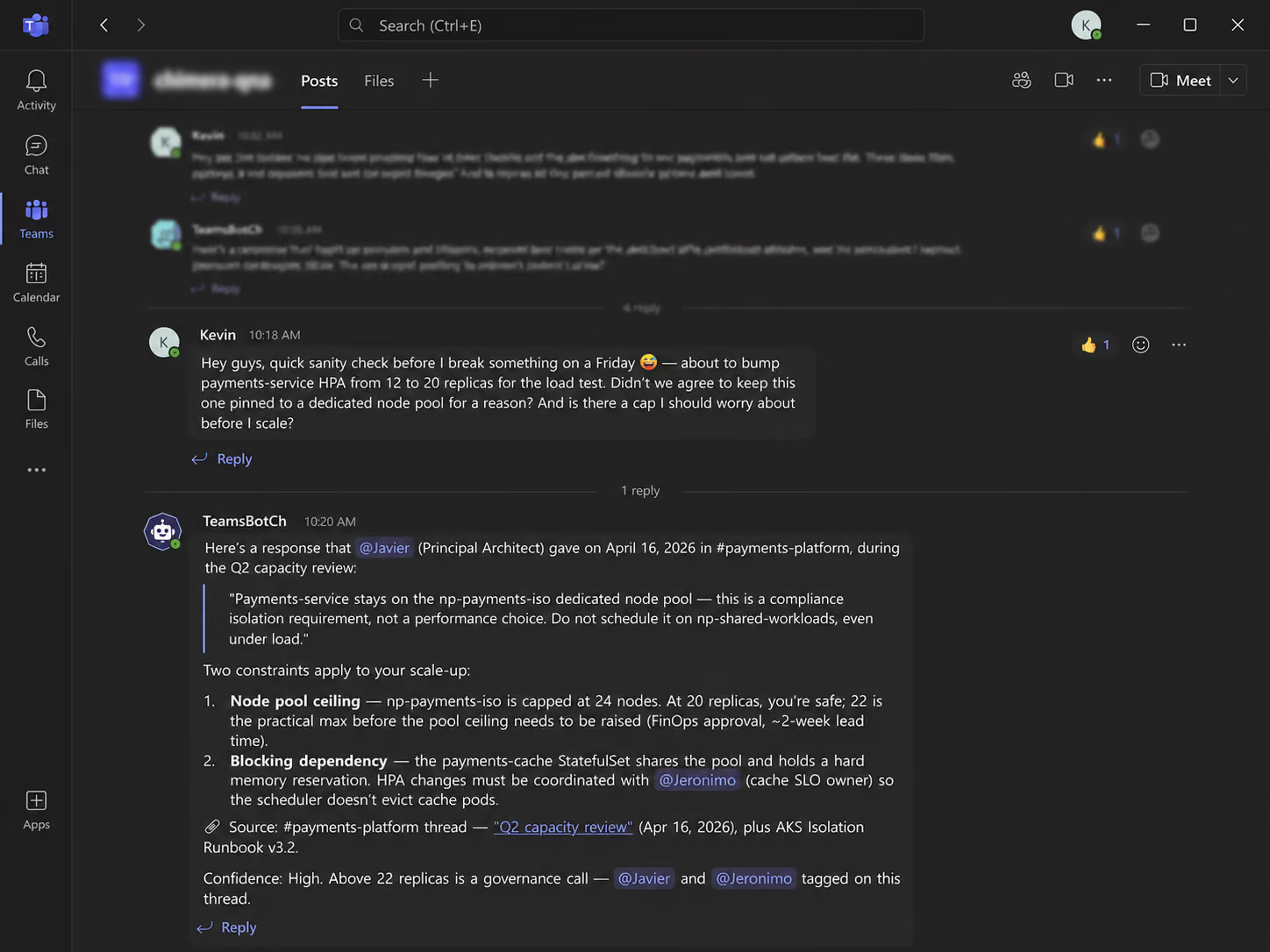
With the assistant inside Microsoft Teams, that reasoning becomes reusable memory. Anyone can ask what was agreed about a node pool, dependency, add-on, or scaling constraint and get a source-backed answer in the thread — or a human escalation when the evidence is thin. Because every validated answer is re-indexed, the knowledge stays accurate and current instead of degrading over time, so the next production decision is faster and safer.
Before: An engineer prepares to scale a payment service under load. The reasoning behind its dedicated node pool — a compliance isolation requirement — lives in an old Teams thread no one remembers. Confirming the constraint, the ceiling, and who owns the dependency takes half a day of pinging colleagues, and quietly resurfaces the next time someone joins.
After: They ask in the channel and get a source-backed answer instantly — the isolation requirement, the practical scaling ceiling, and the blocking cache dependency — with the original author cited and the right people already tagged. Re-indexed on the way through, so the next person gets it in seconds.
For the team, this creates a better feature-shipping rhythm: fewer blocked conversations, faster alignment on environment decisions, and less time spent rediscovering previous agreements. The assistant does not replace documentation or engineering judgment. It helps turn day-to-day collaboration into living documentation that supports delivery while the project is still moving.
The most important design choice was not the model. It was the placement. The assistant needed to live directly inside Microsoft Teams, where questions, follow-ups, agreements, and decisions already happen.
That matters because adoption friction is one of the biggest reasons productivity tools fail to deliver their promise. If the team has to leave the conversation, open another system, and search manually, the value is reduced before the answer is found. By keeping the interaction inside Teams, the assistant turns the existing collaboration channel into the front door for project knowledge.
Questions are asked where the work is happening. AI-generated and human-generated answers return to the same thread. The answer remains visible to the team, so the next person does not have to restart the same investigation.
"That single decision is where much of the productivity gain comes from: the assistant meets people where they already are, instead of adding one more tool to check".
The Teams experience is supported by a retrieval pipeline that turns existing project material into usable delivery context. Documents are uploaded to Azure Blob Storage, indexed through Azure AI Search, and broken into smaller chunks so the assistant can retrieve the most relevant passages instead of forcing the team to search through entire files or long conversation histories.
This is what makes the solution useful for delivery work. The assistant is not relying on unsupported memory. It retrieves approved context, detects similar or duplicate content through embeddings, and uses vector search to find the right information even when people ask the same question in different words.
For the team, the flow is simple: chat (as you usually do) in Microsoft Teams, receive a source-backed answer in the same thread, and keep the resolution visible for future use. Over time, validated answers are added back into the index, so project memory improves as work continues.

The diagram below traces the full path of a conversation — from Teams, through Foundry orchestration and Azure AI Search retrieval, to a source-backed answer (or human escalation) posted back in the same thread. Here's what happens under the hood between the moment a question is identified in Teams and the moment a source-backed answer lands back in the same thread.
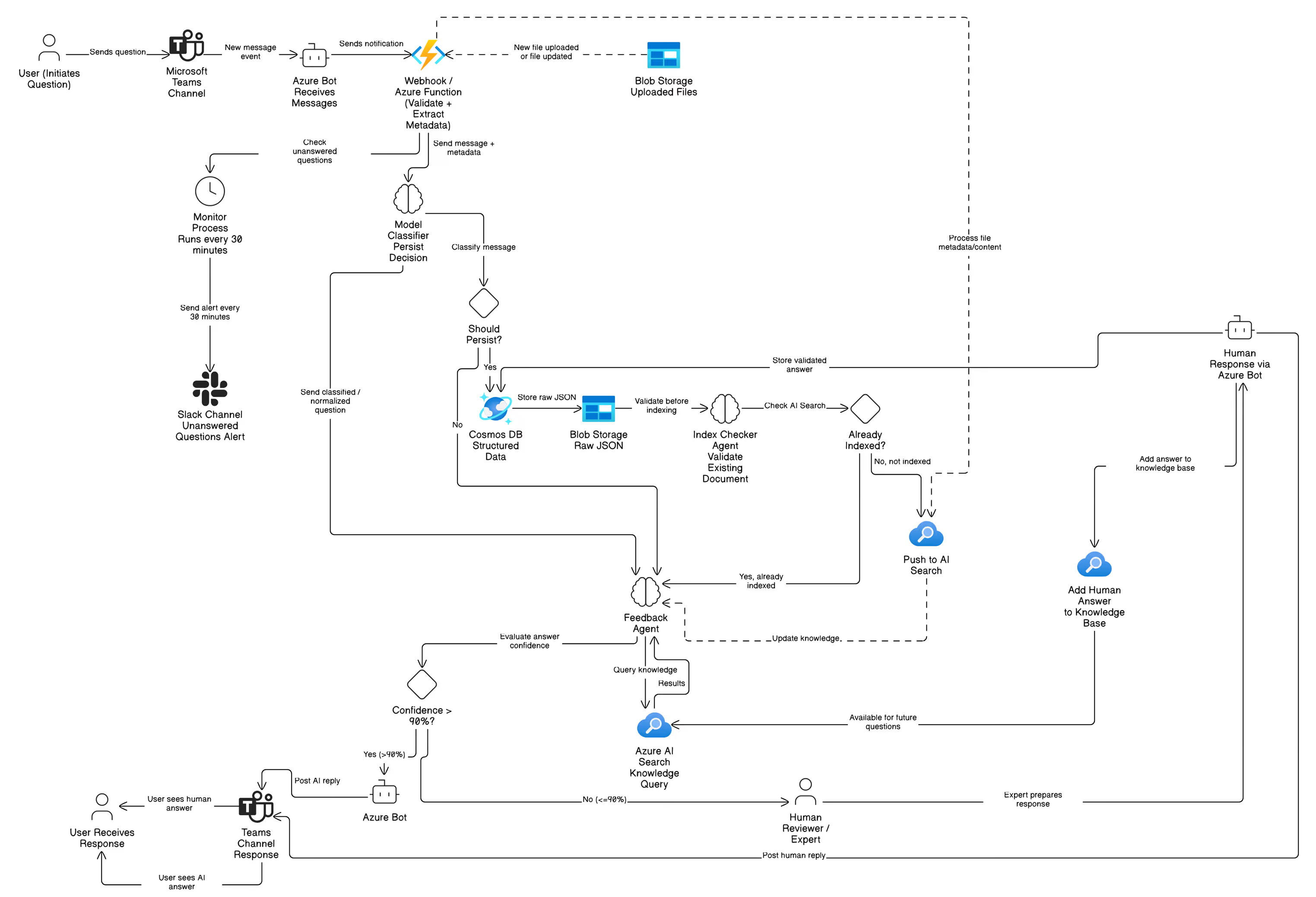
For executives, the operating model matters for two reasons: it must scale economically as usage grows, and it must remain traceable enough to trust. Azure AI Foundry provides the orchestration layer that makes this possible, coordinating classification, retrieval, and response generation so the team sees a single assistant rather than a set of moving parts.
The supporting technology choices reinforce those two priorities. Rather than defaulting to the largest available model, the team deliberately selected a lighter, cost-efficient model for high-volume classification and response generation — trading a marginal amount of raw capability for unit economics that hold up as usage scales across many conversations. Azure AI Search provides source-backed retrieval, and Application Insights captures how each answer was produced. The result is an assistant that is affordable to run frequently and transparent enough to rely on.
A documentation-helper integration should know when not to write the record on its own. When the assistant does not have enough relevant context, it does not guess. It escalates the question to a human. Users can also explicitly request human assistance, and the system detects that intent.
When it escalates, the question is handed to a human — a support engineer or subject-matter expert — who answers directly in the Teams thread, and that human response becomes the authoritative record for the issue. The alerting and follow-up that ensure no escalation is missed are handled by the monitoring loop described next.
This human-in-the-loop model is not a fallback weakness; it is the governance mechanism that protects trust. AI helps capture and reuse knowledge when the information exists, while human expertise remains involved when judgment, confirmation, or missing context is required.
If governance decides when a human should step in, monitoring makes sure that hand-off is never dropped. The integration includes an automated monitoring process that keeps unanswered conversations visible until they are resolved. Every 30 minutes, it reviews open questions that have not yet received either an AI-generated or human-generated response, so a missed question becomes a tracked one rather than a lost one.
If intervention is required, notifications are sent to a dedicated Slack channel. To avoid unnecessary noise, the monitoring service uses exponential backoff, sending additional alerts after progressively longer intervals until a valid answer is detected, the AI later answers with sufficient confidence, or the maximum number of retry attempts is reached.
Once a valid response is found, the incident closes automatically and future alerts for that conversation are suppressed. The result is a practical safety net: open questions remain visible, subject-matter experts are brought in when needed, and resolved answers can continue strengthening the shared knowledge base.
The upside is the mirror image of the problem: if knowledge workers lose roughly 1 day per week hunting for information that already exists, then reclaiming even a fraction of that time — by answering in seconds instead of hours — turns directly into capacity for delivery. Every question resolved once and reused many times compounds that gain across the team.
As a live AI integration, this plays out in practice inside the Azure Kubernetes Service scenario described earlier: questions that once took hours of searching — why a service runs on a dedicated node pool, which dependency blocked a deployment, or what scaling constraint must be respected — are answered directly in the Microsoft Teams thread in seconds, and every validated resolution is re-indexed so it never has to be investigated twice.
This integration does not replace formal documentation. It helps teams reuse what they already know, preserve the context created during delivery, and keep project knowledge from disappearing into scattered conversations.
For leaders, three points are worth remembering:
· One channel. The assistant lives inside Microsoft Teams, so knowledge is captured and reused where the team already works.
· Two-tier responses. AI answers when it has the evidence, and escalates to a human when it does not.
· Zero knowledge lost. Every validated answer is re-indexed, so each resolved question makes the next one faster.
The takeaway for executives is simple: AI productivity is not measured by how impressive the assistant sounds, but by whether teams capture knowledge as work happens, resolve uncertainty earlier, and keep delivery moving with confidence.
Because every validated answer is already source-backed and re-indexed, the knowledge base becomes more than a place to look things up — it becomes structured, evidence-backed raw material for formal documentation. A natural next step is a dedicated documentation agent that draws on this accumulated project memory to draft formal artifacts — architecture notes, troubleshooting runbooks, onboarding guides, and design-decision records — with subject-matter experts reviewing and approving rather than writing from a blank page. In that model, the everyday conversations captured today become the first draft of tomorrow's official documentation, closing the loop between delivery work and the records it should produce.
From this baseline, several improvements can extend the platform's value as adoption grows:
· Broader source coverage. Extend ingestion beyond Microsoft Teams to Azure DevOps and GitHub, SharePoint, wikis, and meeting transcripts, so more delivery knowledge becomes searchable.
· Trust and freshness signals. Add answer confidence scoring and stale-knowledge flagging, so living documentation stays current and reliable as decisions evolve.
· Leadership analytics. Turn execution traces into a knowledge-gap view — most-asked topics, unanswered questions, and time-to-answer trends — showing leaders where to invest.
· Governance and scale. Introduce role- and project-based access control and treat model and embedding selection as ongoing optimization, ready for multi-client rollout.
· Agentic expansion. Move from answering to acting — specialized agents for documentation, onboarding, and compliance, coordinated by Foundry, with human approval gating each action.
Where to start
If you are weighing this pattern for your own delivery organization, three questions are a useful starting point: where does your team lose the most time re-finding answers, which decisions are most costly to lose, and where would a source-backed assistant fit into the tools they already use? We would be glad to walk through how this approach could apply to your teams.